

MCP로 도구 정의하기
공식 Python SDK를 사용하면 MCP 서버 구축이 훨씬 간단해집니다. 복잡한 JSON 스키마를 직접 작성하는 대신, 데코레이터로 도구를 정의하고 SDK가 무거운 작업을 처리하도록 할 수 있습니다.
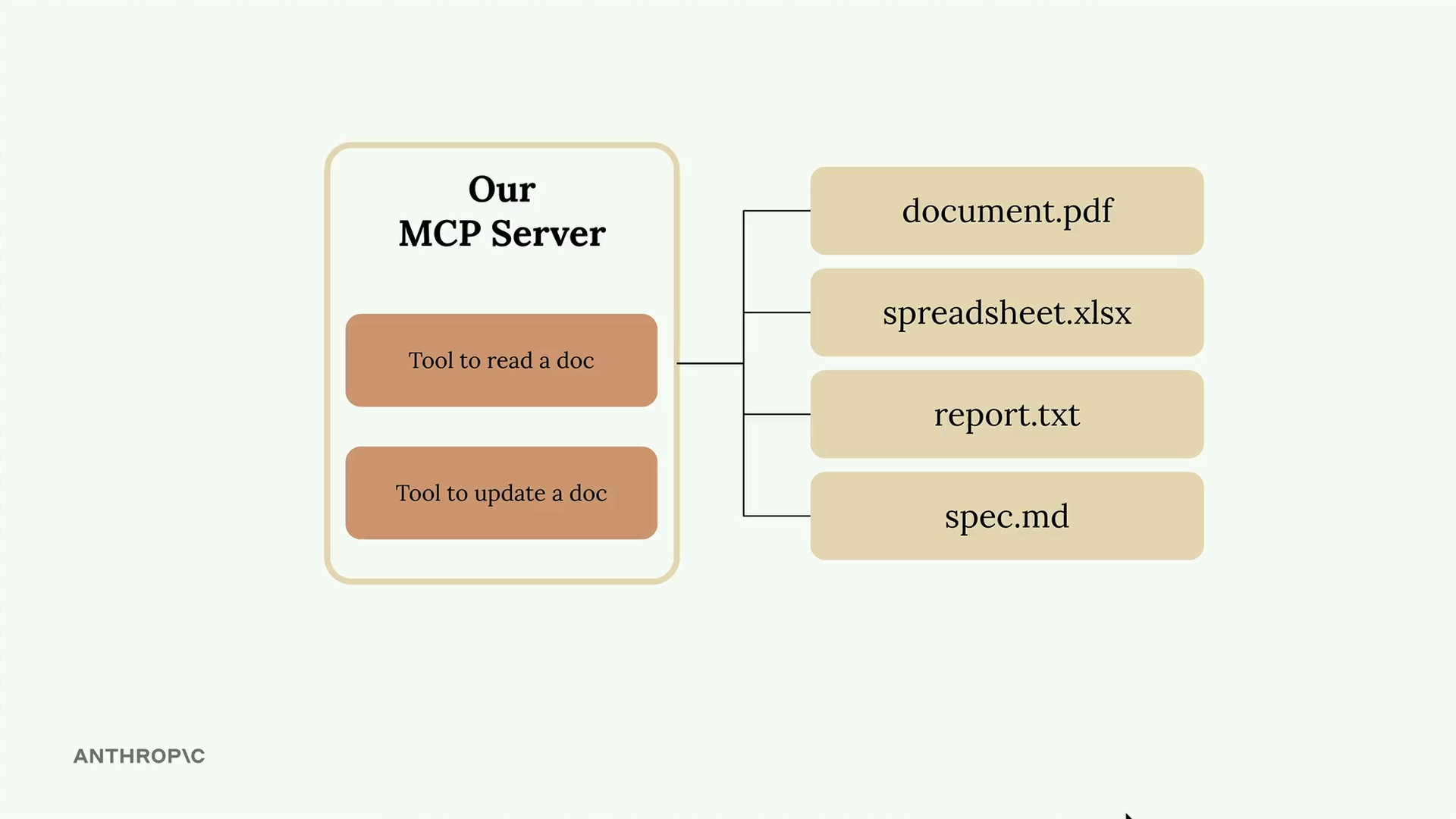
이 예제에서는 두 가지 핵심 도구를 갖춘 문서 관리 서버를 만들고 있습니다: 하나는 문서를 읽는 도구이고 다른 하나는 문서를 업데이트하는 도구입니다. 모든 문서는 키가 문서 ID이고 값이 내용인 간단한 딕셔너리로 메모리에 존재합니다.
MCP 서버 설정하기
Python MCP SDK는 서버 생성을 간단하게 만들어 줍니다. 단 한 줄로 서버를 초기화할 수 있습니다:
from mcp.server.fastmcp import FastMCP

mcp = FastMCP("DocumentMCP", log_level="ERROR")
문서는 간단한 딕셔너리 구조로 저장할 수 있습니다:
docs = {
    "deposition.md": "This deposition covers the testimony of Angela Smith, P.E.",
    "report.pdf": "The report details the state of a 20m condenser tower.",
    "financials.docx": "These financials outline the project's budget and expenditures",
    "outlook.pdf": "This document presents the projected future performance of the system",
    "plan.md": "The plan outlines the steps for the project's implementation.",
    "spec.txt": "These specifications define the technical requirements for the equipment"
}
데코레이터를 이용한 도구 정의
SDK는 데코레이터를 사용하여 도구를 정의합니다. JSON 스키마를 수동으로 작성하는 대신, Python 타입 힌트와 필드 설명을 사용할 수 있습니다. SDK는 Claude가 이해할 수 있는 적절한 스키마를 자동으로 생성합니다.
문서 읽기 도구 만들기
첫 번째 도구는 ID로 문서 내용을 읽습니다. 전체 구현은 다음과 같습니다:
@mcp.tool(
    name="read_doc_contents",
    description="Read the contents of a document and return it as a string."
)
def read_document(
    doc_id: str = Field(description="Id of the document to read")
):
    if doc_id not in docs:
        raise ValueError(f"Doc with id {doc_id} not found")

    return docs[doc_id]
데코레이터는 도구 이름과 설명을 지정하고, 함수 매개변수는 필수 인자를 정의합니다. Pydantic의 Field 클래스는 Claude가 각 매개변수가 무엇을 기대하는지 이해하는 데 도움이 되는 인자 설명을 제공합니다.
문서 편집 도구 만들기
두 번째 도구는 문서에서 간단한 찾기 및 바꾸기 작업을 수행합니다:
@mcp.tool(
    name="edit_document",
    description="Edit a document by replacing a string in the documents content with a new string."
)
def edit_document(
    doc_id: str = Field(description="Id of the document that will be edited"),
    old_str: str = Field(description="The text to replace. Must match exactly, including whitespace."),
    new_str: str = Field(description="The new text to insert in place of the old text.")
):
    if doc_id not in docs:
        raise ValueError(f"Doc with id {doc_id} not found")

    docs[doc_id] = docs[doc_id].replace(old_str, new_str)
이 도구는 세 가지 매개변수를 받습니다: 문서 ID, 찾을 텍스트, 그리고 대체할 텍스트입니다. 구현에는 누락된 문서에 대한 오류 처리가 포함되어 있으며 간단한 문자열 대체를 수행합니다.
SDK 방식의 주요 장점
- 수동 JSON 스키마 작성이 필요 없음
- 타입 힌트를 통한 자동 유효성 검사
- 명확한 매개변수 설명으로 Claude가 도구 사용법을 이해
- Python 예외와 자연스럽게 통합되는 오류 처리
- 데코레이터를 통한 자동 도구 등록
MCP Python SDK는 도구 생성을 복잡한 스키마 작성 작업에서 간단한 Python 함수 정의로 변환합니다. 이 방식을 사용하면 Claude가 올바른 형식의 도구 사양을 받을 수 있도록 보장하면서 MCP 서버를 훨씬 쉽게 구축하고 유지 관리할 수 있습니다.